How Do I Change My Name on Facebook?

June 29, 2023

Share this article

Over time, Facebook has changed the layout of the desktop and mobile app to build an aesthetically pleasing and clean look. Facebook can make unexpected changes that impact user experience and platform usability. These changes can sometimes come as a surprise to users. 


Consumers should pay attention to updates on social media platforms. It is not always as simple as receiving a notification on the platform. The best way to become informed about platform updates is by searching blog sites, forums, and the platform’s website.


Not only should you do that, but you should also experiment with the changes. Experimenting with updates helps you better understand things like posting content and changing the information on your pages. It can even help you with giving and gaining access to a page, and more.


This article will explain the "New Page Experience" and show you how to change your Facebook business name. The change will help your audience easily recognize your business.


What is Facebook’s New Pages Experience? 


In February 2021, Facebook announced that the page layout for Facebook Business pages was changing. Facebook stated that “The new page experience is a way for you to manage your professional presence on Facebook. It can help you build your brand or business, grow your audience, and connect with followers.” 
The overall layout of Facebook Business Pages has changed. This means that, at the first time of viewing, it may be difficult for consumers to navigate business pages. Over time, the viewer will get used to navigating the pages. 
Additionally, it enables page admins to effortlessly switch between their personal and business pages. This allows them to act as either the business or the individual.


The admin of the business page could opt-in to the new pages experience. If the page was not switched manually, Facebook will automatically change it after a certain amount of time.


What Does the Transition to New Page Experience Mean for Your Business? 

According to Facebook, the page undergoes changes that make navigation of the business page more ‘intuitive.’ While the transition does make it easier for users to view your page, the real changes happen at the other end. 
Facebook said that “When your Page updates to the new Pages experience, all Page content including posts, photos, videos, stories and Groups your page is an Admin of will automatically move to your new Page.” Along with transferring over the content, the number of followers you have gained will also carry over. 
Along with that, you will also be able to switch between your own Facebook profile and the business page. Facebook has provided updated management tools that allow the admin to give access to other users to manage the page.


How to Change Your Name on Facebook 

Since you are wondering how to change your name on Facebook, let us dive right in. Please note that this should be done on the desktop version and not on the Facebook app. 
Name change requests are not granted immediately. There is a process that you must follow so that Facebook can verify and ratify the change. Here is what you need to do:


Logging into Facebook 

The first step is to log onto Facebook. You will have to log into the desktop app by entering your Facebook password and email. 
To make any changes to your Facebook Business page, you will need to have your password readily available. It will prompt you to enter it before Facebook can start the verification process. 
Another thing to note is that an admin must have Facebook access with full control of the business page to make any changes.


Navigating Your Profile 

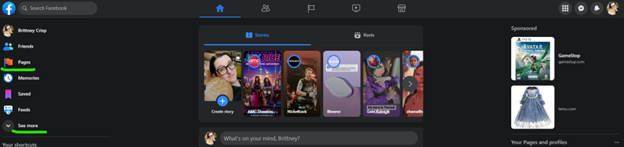
After entering your password, Facebook will take you to your feed. You will then look to the left side of your profile to locate the “Pages” tab.
Dark-themed gaming app home screen with game cover tiles and a right-side library panel

There should be an orange flag next to it. If you do not see the pages tab, click “see more” to expand the menu on the left-hand side. Click on Pages. 
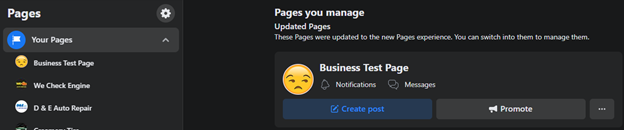
It will take you to the next page that shows you the pages that you have access to. Locate your business and click on it. 

Dark-themed Facebook Pages manager showing a “Bachelors Test Page” with page action buttons.

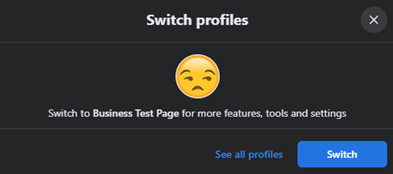
To switch to your business profile, scroll down and locate the “switch” and click on it. It will have you confirm the switch by clicking on “switch.” 

Dark modal titled “Switch profiles” with a sad emoji and a blue “Switch” button.

Operating as the Business 

You are now operating as a business on Facebook. You can confirm that you are on your business page by looking in the upper right corner of the page. 
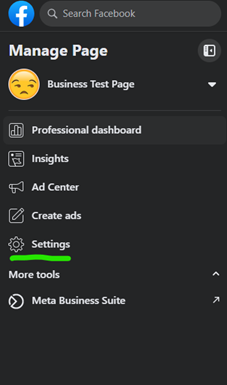
The name change process can finally begin. Click on the “Settings” tab. The settings tab is on the left-hand side of the page. After clicking on the settings tab, you will notice that it brought you to the business settings.

Facebook page management menu for “Business Test Page” in dark mode, with Settings highlighted in green.

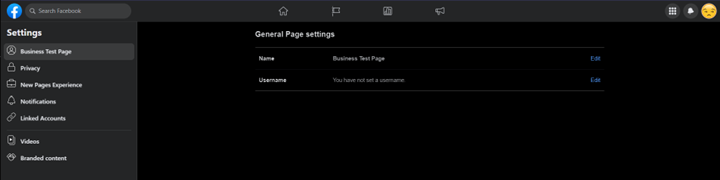
In the middle of the page, you will see “General Page Settings.” Under that, you will see the page name of your business. You will then be able to change it by clicking the edit button on the right side of the business name. 

Dark-themed settings page showing network adapter details in a centered table.

You can also change the username of the business. That will change the Facebook URL of the page. The username will show up on the link. 
For the changes to go through, the admin may have to manually type in their password. Our onboarding team has noticed that it will not always auto-fill. 
Facebook requires two things before requesting a change to the page name. if you are planning to change the entire name of the business page, follow these steps: 
  1. The logo and website of your business must be updated. The logo must match the new name of your business. 
  2. A post announcing the name change of your business so that your audience and Facebook are aware that you are making the change. 

There you have it, that is how you change your name on Facebook. If you are our customer and do not know how to use Facebook, our onboarding team can help you. This way, your customers will know that your business is making those changes. If you have any questions, contact us and we will be able to help! 

Recent Posts

Plumber illustrating a content marketing strategy for service-based businesses
By Brianna Anderson • September 30, 2026
Master your content marketing strategy for service-based businesses. Build trust, improve local SEO, and generate leads with these expert tips!
Team collaborating on website content optimization with wireframes and notes.
By Nicole Symon • September 27, 2026
Want more sales? Master website content optimization with our checklist to improve rankings, build trust, and turn more visitors into loyal customers.
Mobile social media engagement for B2C lead generation.
By Brianna Anderson • September 24, 2026
Master B2C lead generation with expert strategies. Combine SEO, social media, and landing pages to attract more customers and grow your business.
Person analyzing digital marketing data and analytics on a laptop.
By Brianna Anderson • September 23, 2026
What is digital marketing analytics? Learn the KPIs and metrics your business should track to boost ROI and stop wasting your marketing budget.
Email notification icon illustrating marketing automation benefits.
By Brianna Anderson • September 22, 2026
Discover top marketing automation benefits for small businesses. Boost lead conversion, save time, and grow revenue on autopilot. Learn more today.
Person using a laptop to explore what is marketing automation: A Beginner's Guide.
By Nicole Symon • September 21, 2026
Curious about marketing automation? Learn how small businesses use automation to nurture leads, save time, and grow without losing the personal touch.
Person using a laptop to research why SEO for automotive is important.
By Nicole Symon • September 20, 2026
Wondering why is SEO for automotive important? Discover how local search, Google Maps, and reviews drive consistent appointments for your shop.
Man using a laptop for SEO and advertising work.
By Brianna Anderson • September 19, 2026
Discover how SEO and advertising work together to boost your traffic. Learn why an integrated strategy is the key to growing your business online!
Person using a smartphone to increase Google Business Profile traffic.
By Nicole Symon • September 15, 2026
Want to rank higher in local search? Discover ways to increase Google Business Profile traffic and convert more local searches into customers.
close up of a tire on a car.
By Lisa Allison • September 2, 2026
Discover how tire dealers can use SEO, social media, reviews, websites and digital advertising to get found, build trust and win more customers online.
Show More