How To Stop Facebook Spam Bots

June 25, 2024

Share this article

Recently, one of the most common complaints about social media platforms has been an overabundance of spam bots. These bots are particularly bothersome on Facebook, as they send unwanted messages that clog your inbox, harass users, and compromise security. Around 4% of Facebook's monthly active users were fake accounts in the first quarter of 2024. 


In this article, we'll be talking about what Facebook spam bots are and how you can prevent them from commenting on and messaging your accounts. 


What Are Spam Bots?

A bot is a software program that's designed to repeat automated tasks and imitate human behavior. Spam bots are automated programs that share spam content online, often on social media sites. Spam bots work by creating accounts and sending unwanted messages that are often designed to spread malware or trick users. 


Beyond sending out spam messages or creating spam posts, these bots may also interact with actual users on social media platforms. They may like posts, publish spam comments, and share other users' content with their followers. 


How to Spot a Spam Bot on Facebook

Social media spam bots generally mimic real people, and they can be convincing, especially if you don't know what to look out for. Here are some tips for differentiating Facebook spam bots from actual Facebook users.


Generic or Promotional Comments

The content that spam bots post usually lacks personality and unique details. Their comments also tend to include promotions or requests for engagement.


Some examples of common promotional comments posted by Facebook spam bots include:

  • "Love your content! Contact me at …"
  • "Big fan of what you're doing! Check your DMs so you don't miss out on a great deal!"
  • "Send me a message to learn about an exciting opportunity!"


Little to No Details on Their Profile

Whenever you suspect that an account is a spam bot, click on the profile. 


Since they aren't real people, bots often have unfinished profiles with images taken from other accounts or online pictures. The account is most likely a bot if it has little to no personal details on its profile, has a suspicious profile picture, and doesn't have a reliable friends list.


Check the account's bio for personal details or unique touches. If it's blank or contains only generic promotions, the account is probably a spam bot. 


Unusual Actions Online

Large following, linking, or commenting spikes can indicate that an account is a bot. Real people are generally more consistent with their actions online and won't have extreme spikes of unusual activity.


Following Ratios

You should also check any suspicious account's ratio of followers to the number of accounts they follow. An account that follows many people but doesn't have many followers may be a bot. 


Promotional Posts

When a seemingly personal social media account posts a lot of promotional content, specifically content that directs users to click on various links, that's a sign of a bot account. Just keep in mind that it isn't suspicious for business accounts to post promotional content, since that's their purpose. 


How to Stop Spam Bots on Your Business's Facebook Account

If you have bad bots on your business's Facebook account, you can fight them.


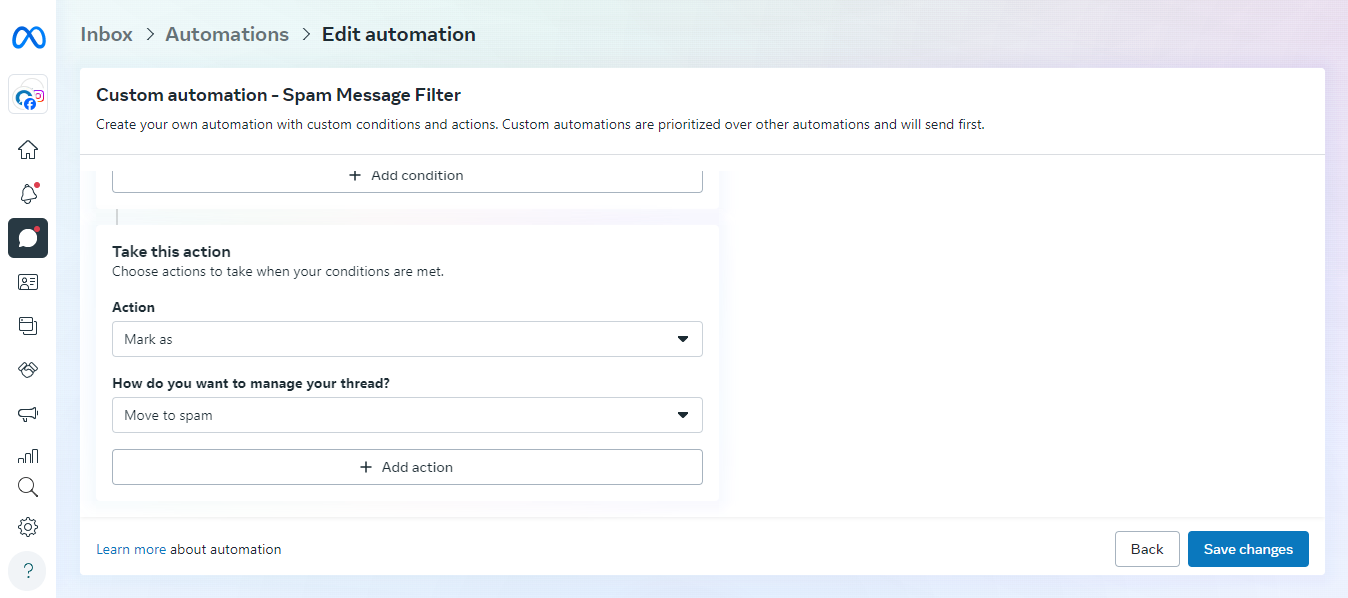
Follow these steps to filter out messages from spam bots on your profile:

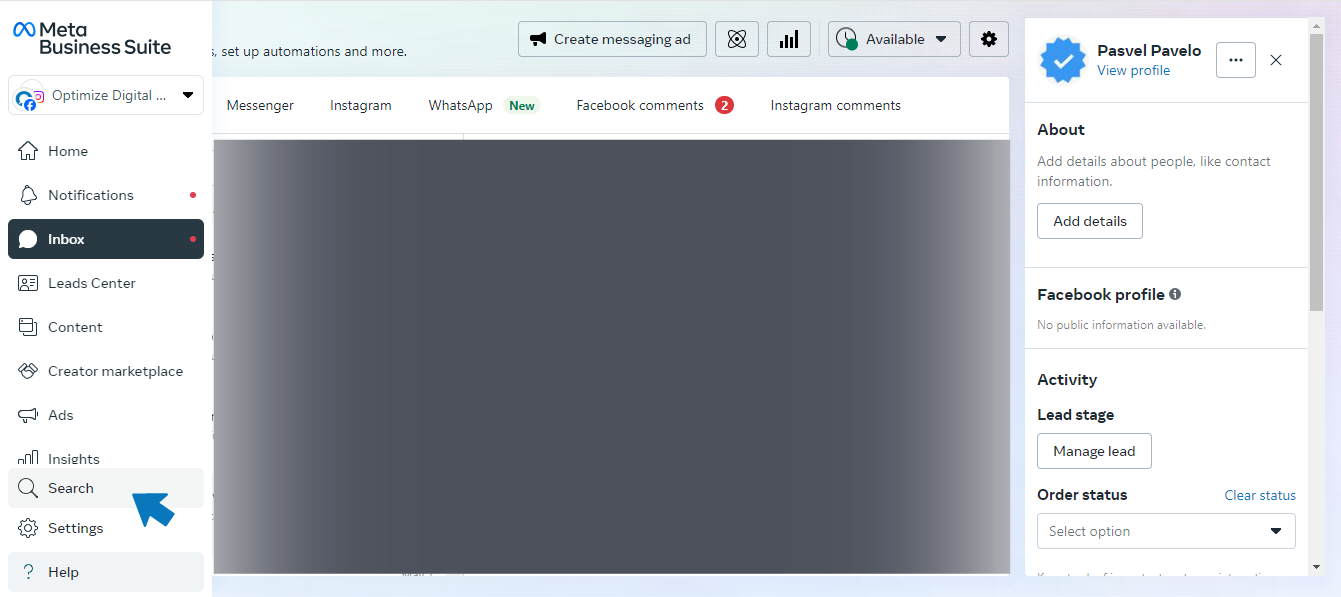
  • Log into your business's Facebook account and go to your Messenger inbox. 
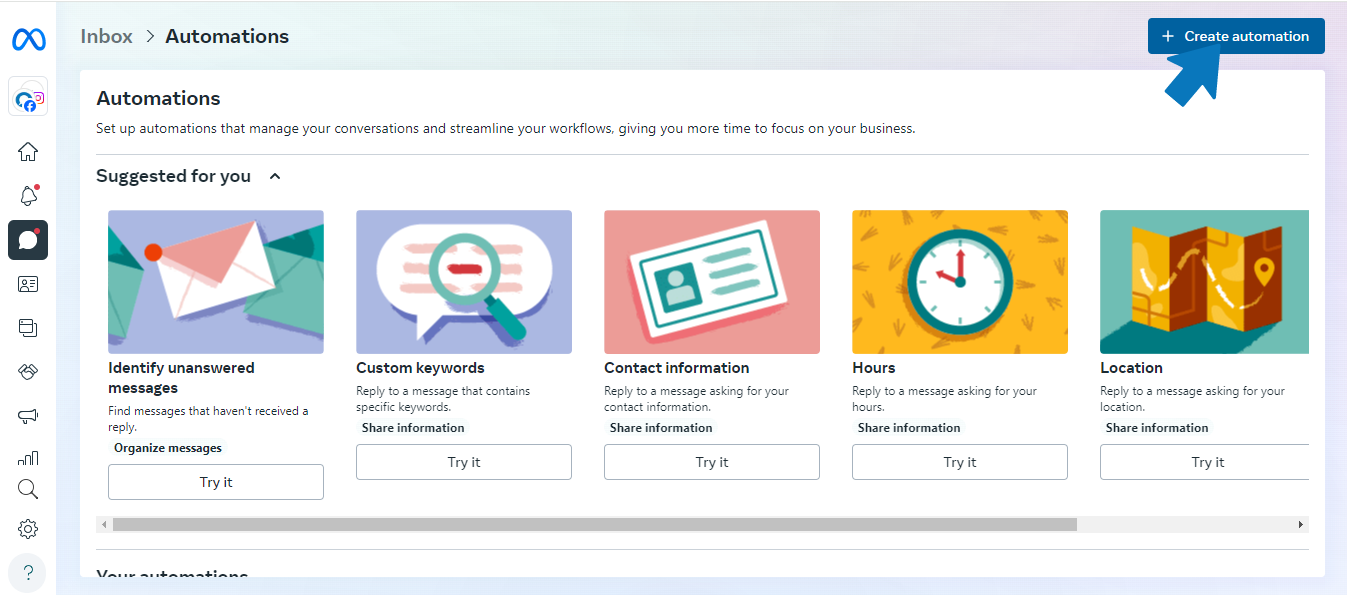
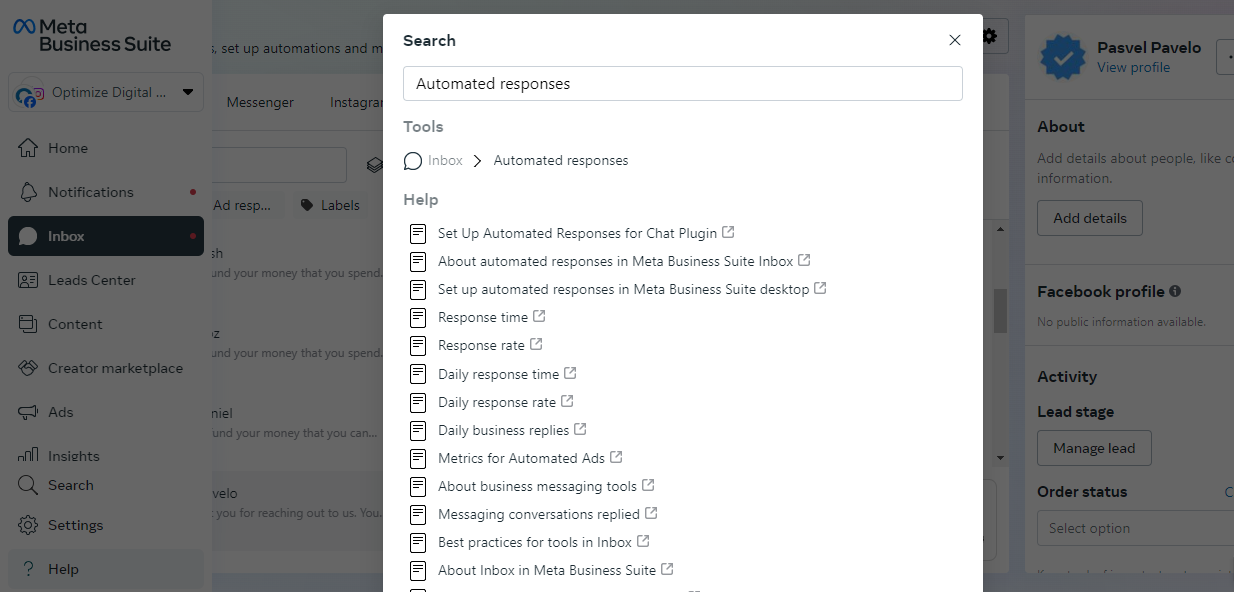
  • Click on the "Automations" Tab. If you can't find this tab, you can search for "automations" in your account.
Web app dashboard with left sidebar and a gray content area, plus a right-hand details panel
Blurred dashboard screen with a centered white dialog showing a checklist of items.
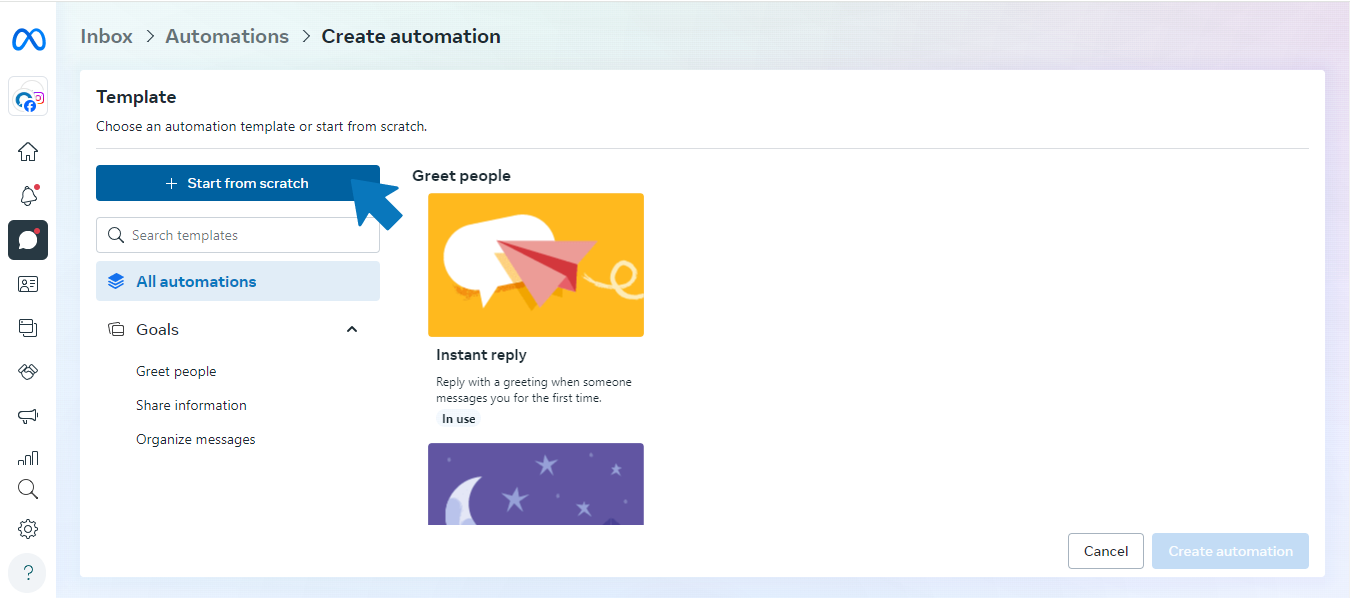
  •  Click "Create Automation," and then click "Start from scratch."
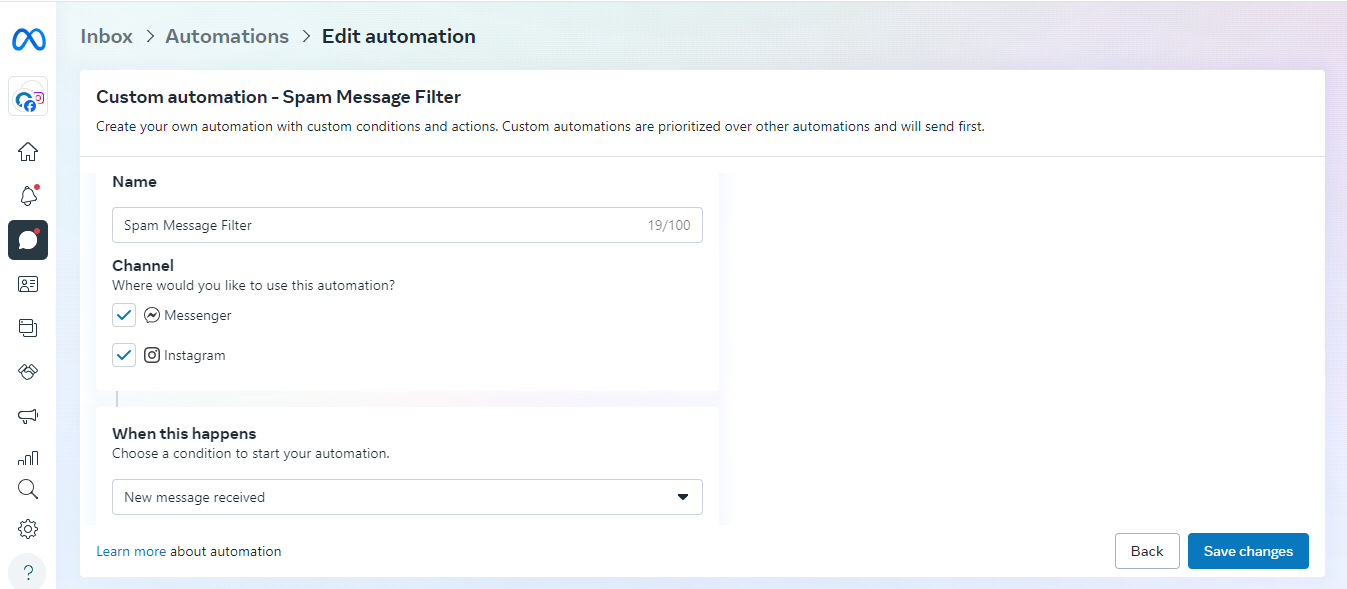
  • From there, you can name your automated message, pick what channel you would like it to apply to, and pick when the automation goes off. 
A web app dashboard with colorful tiles for documents, chat, email, clock, and maps icons.
Website page with a left navigation menu and two colorful content cards on a white layout
  •  Select "New Message Received" for when the automation should go off.
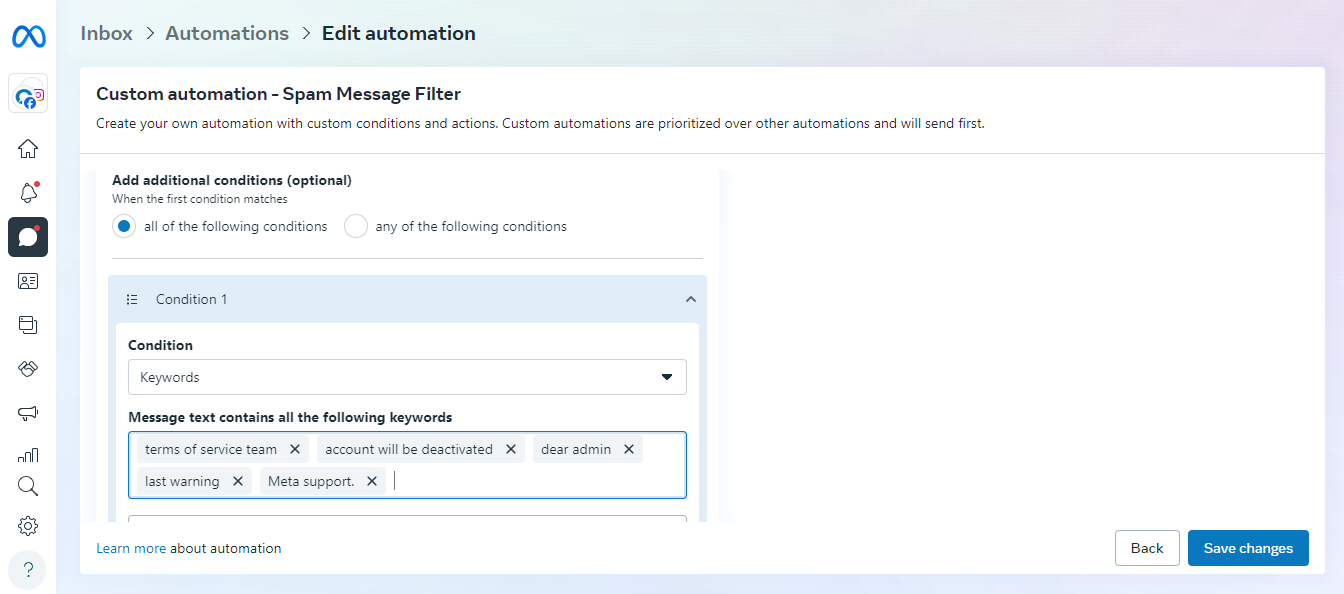
  • Click "Add condition" under "What happens."
A web form page with fields, dropdowns, and a blue action button in a browser window.

 Click "Keywords" and continue filling in the keywords that tend to appear in your spam messages on Facebook. Some examples of common keywords from bots sending spam messages include "terms of service team," "account will be deactivated," "dear admin," "last warning," and "Meta support."

Light blue web app settings page with a permissions dropdown and blue Save button.
  •  Select "Mark as" for the action you want Meta to take on messages that include these keywords. 
  • Manage your thread by clicking "Move to spam."
Web app form with dropdowns and a blue Generate button on the right

Make sure to save your changes, and you're all set! Messages containing the designated keywords will automatically go to your spam folder.   Unfortunately, other types of spam bots may affect your business. For example, email spam bots send emails that may contain a phishing attack, participate in email address harvesting, or simply clog your inbox. You can address these bots with similar strategies for automatically filtering spam messages.


Protect Your Business and Get More Out of Your Facebook Marketing

Facebook is a powerful marketing tool, but spam bots can get in the way. Address them as soon as possible to engage your target audience and improve your Facebook marketing strategy.


Struggling with Facebook marketing? Optimize is here to help. Our team of digital marketing experts can take your business's Facebook account to the next level by dealing with bots and implementing an effective social media marketing strategy. 


If you would like to learn more about how Optimize can help you manage your Facebook account, schedule a free consultation today!

Recent Posts

Plumber illustrating a content marketing strategy for service-based businesses
By Brianna Anderson • September 30, 2026
Master your content marketing strategy for service-based businesses. Build trust, improve local SEO, and generate leads with these expert tips!
Team collaborating on website content optimization with wireframes and notes.
By Nicole Symon • September 27, 2026
Want more sales? Master website content optimization with our checklist to improve rankings, build trust, and turn more visitors into loyal customers.
Mobile social media engagement for B2C lead generation.
By Brianna Anderson • September 24, 2026
Master B2C lead generation with expert strategies. Combine SEO, social media, and landing pages to attract more customers and grow your business.
Person analyzing digital marketing data and analytics on a laptop.
By Brianna Anderson • September 23, 2026
What is digital marketing analytics? Learn the KPIs and metrics your business should track to boost ROI and stop wasting your marketing budget.
Email notification icon illustrating marketing automation benefits.
By Brianna Anderson • September 22, 2026
Discover top marketing automation benefits for small businesses. Boost lead conversion, save time, and grow revenue on autopilot. Learn more today.
Person using a laptop to explore what is marketing automation: A Beginner's Guide.
By Nicole Symon • September 21, 2026
Curious about marketing automation? Learn how small businesses use automation to nurture leads, save time, and grow without losing the personal touch.
Person using a laptop to research why SEO for automotive is important.
By Nicole Symon • September 20, 2026
Wondering why is SEO for automotive important? Discover how local search, Google Maps, and reviews drive consistent appointments for your shop.
Man using a laptop for SEO and advertising work.
By Brianna Anderson • September 19, 2026
Discover how SEO and advertising work together to boost your traffic. Learn why an integrated strategy is the key to growing your business online!
Person using a smartphone to increase Google Business Profile traffic.
By Nicole Symon • September 15, 2026
Want to rank higher in local search? Discover ways to increase Google Business Profile traffic and convert more local searches into customers.
close up of a tire on a car.
By Lisa Allison • September 2, 2026
Discover how tire dealers can use SEO, social media, reviews, websites and digital advertising to get found, build trust and win more customers online.
Show More